

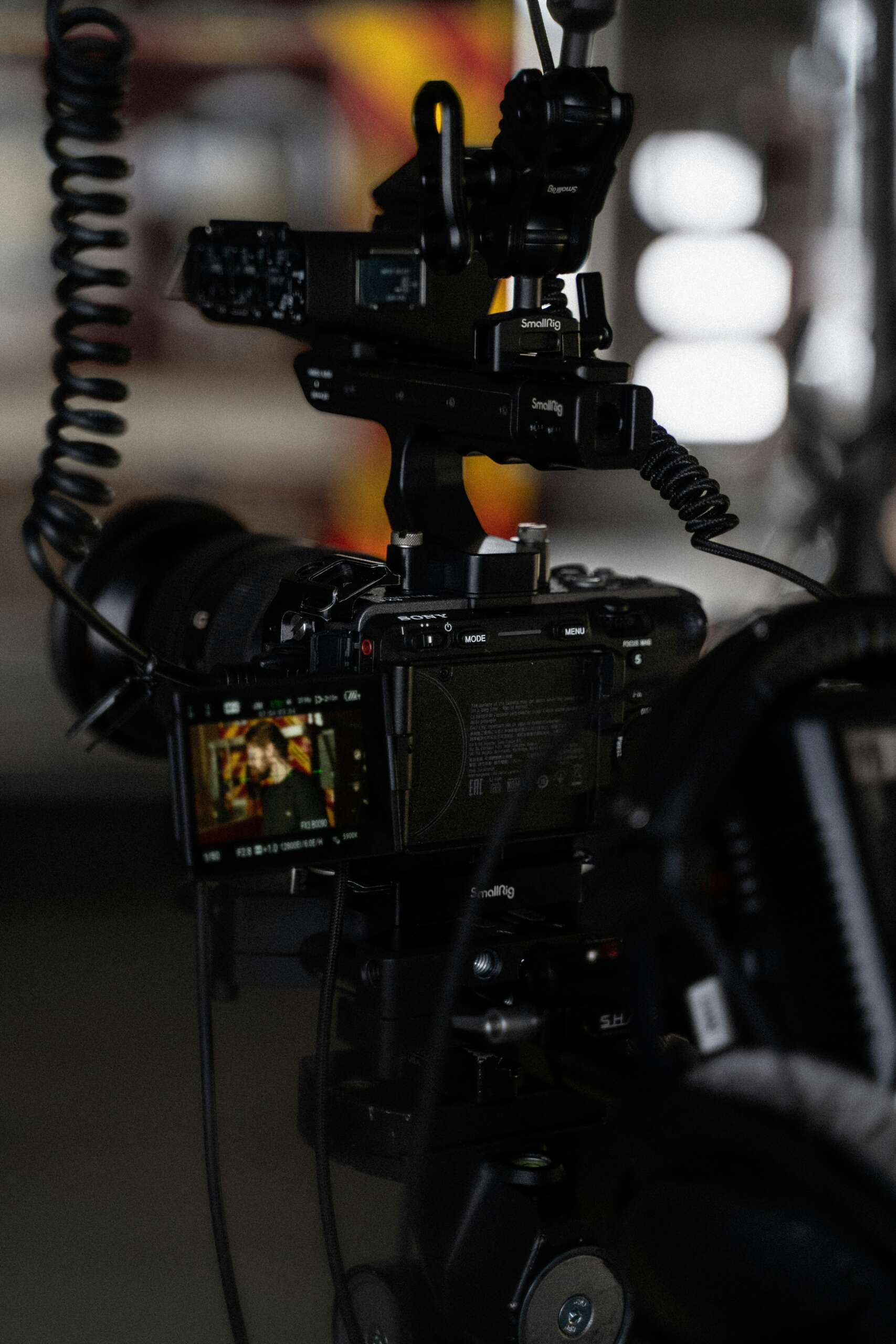
Sony Fx3 with Nisi Mattebox by Camera Rentals DOP-Care
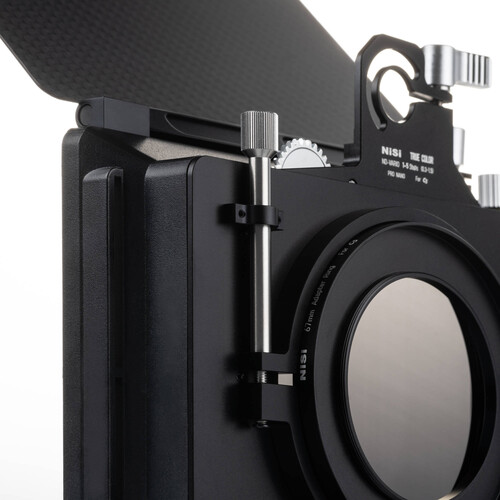
Sony FX3 with Nisi MatteBox & Nisi C5 Filmmaker Kit – A Complete Professional Setup Guide
At DOP-Care, we specialize in more than just camera rental services—we provide fully customized setups designed specifically for Directors of Photography. If you’re looking to replicate a high-caliber setup for your next shoot, you can rent all the necessary gear directly from us, ensuring a seamless production experience.
Follow us on Instagram for behind-the-scenes content and updates: https://www.instagram.com/camerarental_dopcare/
Introduction
Setting up a professional camera rig can be a game-changer for your filmmaking workflow. In this guide, we’ll walk you through the step-by-step process of building a Sony FX3 with Nisi Matte Box & Nisi C5 Filmmaker Kit, along with other high-end accessories. This setup ensures you maximize the full potential of your gear and achieve cinematic-quality results.
Step 1: Attach the Sony FX3 Body
The foundation of this rig is the Sony FX3, a compact powerhouse known for its cinematic 4K video capabilities and ergonomic design. Its lightweight body makes it ideal for handheld and gimbal work while delivering stunning image quality.
Step 2: Connect the Default Handle
Attach the default handle that comes with the Sony FX3. Beyond improving grip and stability, this handle provides essential XLR audio inputs, making it indispensable for professional productions.
Step 3: Mount the Rode VideoMic Pro Plus
High-quality visuals need equally high-quality sound. Mount the Rode VideoMic Pro Plus onto the handle’s cold shoe. This shotgun microphone captures clear directional audio while minimizing unwanted ambient noise—perfect for interviews, documentaries, and on-location shoots.
Step 4: Attach the G-Master 2 16-35mm Lens
Next, connect the Sony G-Master 2 16-35mm lens to the FX3 body. Known for its sharpness and versatility, this lens is ideal for both sweeping wide shots and detailed close-ups, making it a great all-around choice for cinematographers.
Step 5: Add the Atomos Shinobi 7-inch Monitor
Monitoring footage on a small built-in screen can be limiting. Using an HDMI cable, connect the Atomos Shinobi 7-inch monitor to the FX3’s HDMI output. With its high brightness and accurate colors, the Shinobi makes framing, focusing, and exposure checks much easier on set.
Step 6: Power the Setup with a V-Mount Battery
For uninterrupted shoots, power your rig with a V-mount battery. This can simultaneously power both the FX3 and the Atomos monitor. Use a D-tap to DC cable for the monitor or attach a battery directly for maximum flexibility.
Step 7: Set Up the Nisi C5 Filmmaker Kit with Nisi Matte Box
One of the highlights of this setup is the Nisi C5 Filmmaker Kit. Attach the Nisi Matte Box to the front of the G-Master lens and insert ND or diffusion filters as needed. This gives you better control over exposure, reduces glare, and provides a cinematic look right in-camera. The combination of the Sony FX3 with Nisi Matte Box & Nisi C5 Filmmaker Kit is a proven way to elevate your visuals.
Step 8: Connect to an External Director Monitor
Finally, ensure the director has a real-time view of your footage. Use the Hollyland Pyro H to wirelessly transmit video from the FX3 to a 28-inch director monitor. This allows creative teams to collaborate effectively without being tethered to the camera.
Watch the Setup in Action
To see how each component works together in a real-world shoot, watch our 53-second video that captures the entire rigging process—from attaching the FX3 body and handle to setting up the Nisi C5 Filmmaker Kit and wireless monitoring system.
Why Choose DOP-Care for Your FX3 Setup?
At DOP-Care, we don’t just rent gear; we help you configure professional-grade rigs that save time and ensure reliable results on set. Whether you need a Sony FX3 with Nisi Matte Box & Nisi C5 Filmmaker Kit or a complete production-ready package, we’ve got you covered with expert technicians and top-tier equipment.
Conclusion
By following these steps, you’ll transform your Sony FX3 into a filmmaking powerhouse, ready to tackle any project with precision and creativity. Whether you’re capturing landscapes or shooting complex scenes, this setup ensures you’re equipped for success.
FAQs
Q1: Can I rent a Sony FX3 with Nisi Matte Box & Nisi C5 Filmmaker Kit from DOP-Care?
Yes, we provide complete rental packages including the Sony FX3 body, Nisi C5 Matte Box, lenses, monitors, and more.
Q2: Do you offer technicians along with the rental gear?
Absolutely. Our expert team ensures proper setup, calibration, and on-set technical support.
Q3: Is the Nisi C5 Filmmaker Kit worth using with the FX3?
Yes, it offers excellent light control and cinematic filter options, making it an essential tool for professional cinematography.
Q4: Can this setup support wireless video transmission for directors?
Yes, with the Hollyland Pyro H and a director’s monitor, you can provide a wireless live feed on set.
Q5: Do you offer delivery and setup outside Hyderabad?
Yes, we provide transport and support for shoots across India.